A Turnitin AI score can look simple at first. You submit a paper, the report comes back, and there is a percentage attached to it.
But the number is not always as straightforward as it looks. A 0% score, a low hidden score shown as *%, and a visible 20% score do not mean the same thing. Turnitin also separates AI detection from plagiarism detection, so a paper can have a low similarity score and still have an AI writing score.
That is why students are not just asking what the percentage means; they also want to know which scores are acceptable, safe, or likely to make an instructor look more closely.
What Is Turnitin?
Turnitin is one of the most widely used academic integrity platforms in schools, colleges, and universities. It is best known for plagiarism and similarity checking, but many institutions also use Turnitin's AI writing detection report.
The important thing to understand is that Turnitin is usually controlled by the school or instructor. Students normally cannot open Turnitin, paste in an essay, and check the AI score whenever they want. In most classes, the student submits an assignment through a school system like Canvas, Blackboard, Moodle, Brightspace, or Google Classroom. Turnitin then processes the paper and gives the report to the instructor.
That report can include a similarity score for matched sources, an AI writing percentage, and highlighted sections that Turnitin believes are likely AI-generated or AI-modified. This is why Turnitin feels more stressful than a public AI checker. If a free AI detector gives you a bad score, you can revise the text. If Turnitin flags your paper after submission, your instructor may already be looking at it.
How Turnitin Shows AI Scores
Turnitin does not display every AI score the same way. Newer reports use a special display system for low scores.
A true 0% AI score means Turnitin did not identify qualifying text as likely AI-generated. If the score is between 1% and 19%, Turnitin does not show the exact percentage. It shows *% instead. It also does not highlight specific sentences in that low range.
Once the score reaches 20% AI or higher, Turnitin shows the percentage and highlights the sections it believes are likely AI-generated, AI-paraphrased, or modified by an AI bypasser.
That 20% threshold matters because it changes what the instructor sees. Below 20%, the report is intentionally less specific. At 20% or above, the score becomes visible and the highlighted sections are easier to inspect.
What Percentage of AI Is Acceptable on Turnitin?
The best practical target is under 20% AI.
That does not mean 20% automatically proves misconduct. It also does not mean every professor has the same cutoff. Schools have different AI policies, and teachers interpret reports differently. But if you are asking what percentage is acceptable or safe, under 20% is the range you want because Turnitin does not show a normal score or sentence highlights below that threshold.
| Turnitin AI score | How it appears | What it usually means |
|---|---|---|
| 0% AI | 0% detected as AI | Cleanest result |
| 1% to 19% AI | *% detected as AI | Low AI signal, no exact score or highlights |
| 20% to 49% AI | Visible percentage with highlights | Review before submitting |
| 50% to 79% AI | Visible percentage with more flagged text | Higher risk |
| 80% to 100% AI | Visible percentage, mostly flagged | Very high risk |
Another useful rule is the 50% line. Under 50%, the paper is still mostly being read as human. Over 50%, the qualifying prose is being read as mostly AI-generated or AI-modified. That does not make the report perfect, but it explains why a 21% score feels very different from a 68% score.
What Does 0% AI Mean on Turnitin?
A 0% detected as AI score means Turnitin did not identify any qualifying text in the submission as likely AI-generated.
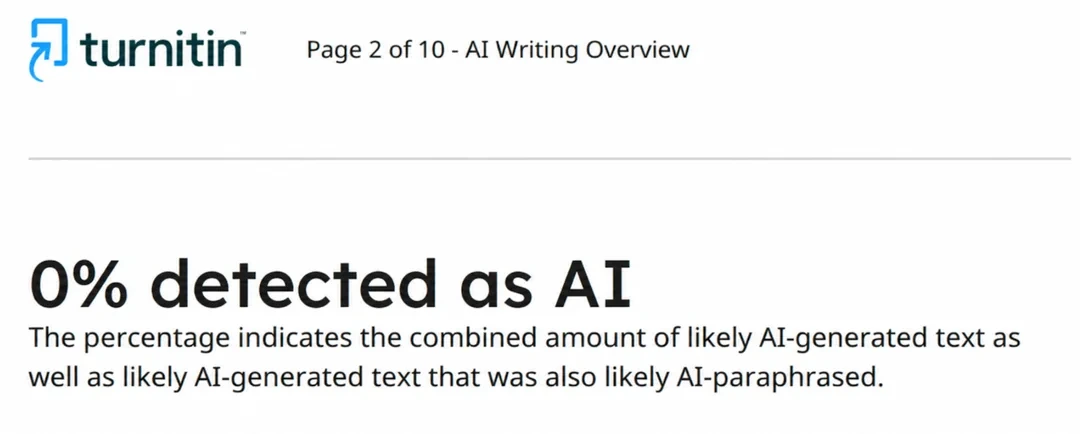
This is the cleanest possible result. If Turnitin shows 0% AI, the report is not highlighting your text as AI-generated.
That is why many students aim for 0% when they are worried about AI detection. It is not only about the number. It is also about avoiding highlighted passages that could cause an instructor to look more closely.
If your writing was created with ChatGPT, Claude, Gemini, or another AI tool, basic paraphrasing may not be enough to reach 0%. Turnitin looks at deeper writing patterns, not only swapped words. If you want to get your writing closer to 0% AI, TwainGPT's AI humanizer can rewrite AI-generated text naturally and bypass Turnitin's AI detection before you submit it.
What Does *% Mean on Turnitin?
The *% indicator is one of the most misunderstood parts of Turnitin's AI report.
It does not mean Turnitin found a huge hidden AI score. It means the score is somewhere between 1% and 19%, and Turnitin does not consider that low range reliable enough to show as a normal percentage. It also does not highlight sentences in that range.
Turnitin uses this design because low AI percentages are less reliable and carry a higher risk of false positives. A few sentences may look slightly AI-like, but that does not mean the whole paper was written by AI.
So if you see *%, the practical interpretation is simple: Turnitin found a low AI signal, but not enough to show sentence highlights or a normal score.
Is 20% AI Acceptable on Turnitin?
Sometimes, but you should not treat 20% as automatically acceptable.
A 20% AI score means Turnitin believes about one fifth of the qualifying text looks AI-generated or AI-modified. Some teachers may treat that as a small amount and ask no questions. Others may ask why certain sections were flagged. Some schools may have strict policies where any visible AI score matters.
The context matters. A professor may look at whether the assignment allowed AI assistance, whether you disclosed AI use if required, whether the highlighted sections are central to the assignment, and whether the writing matches your normal style. Drafts, notes, outlines, and version history can also matter if a score is questioned.
If you are at 20% or higher before submitting, it is worth revising the sections that sound the most robotic. You can rewrite manually, or use an AI humanizer to make the text sound more natural before you submit.
Is 50% AI Acceptable on Turnitin?
A 50% AI score is much riskier.
As a basic rule of thumb, anything under 50% means the paper is still mostly being read as human. Anything over 50% means Turnitin is classifying most of the qualifying prose as AI-generated or AI-modified.
That does not mean a 51% score is automatic proof of cheating. Turnitin's report should be interpreted by the instructor alongside school policy, assignment rules, drafts, and student context. But from a student's point of view, 50% is not a comfortable number.
If your draft is showing around 50% AI or higher in an AI detector, you should assume it needs major revision before you submit. Rewrite the structure, change the sentence rhythm, add more personal reasoning, strengthen examples, and remove the generic AI flow.
AI Score vs Similarity Score
Turnitin's AI score and similarity score are different.
The similarity score checks whether text matches existing sources. The AI score checks whether the writing is likely to be AI-generated or AI-modified. A paper can be original, with low similarity, and still look AI-generated. A paper can also sound fully human but still match sources too closely.
| Score | What it measures | Example |
|---|---|---|
| Similarity score | Text that matches existing sources | Quotes, copied passages, source overlap |
| AI writing score | Text that looks likely AI-generated | ChatGPT text, robotic structure, AI-paraphrased writing |
The two scores do not replace each other. If your assignment uses sources, you need to care about both originality and AI detection. If your main worry is AI detection, use TwainGPT's AI detector before submitting. It can give you a practical idea of whether your writing may look AI-generated, especially since most students cannot access Turnitin directly.
Turnitin AI Report Requirements
Not every file can generate a Turnitin AI writing report.
Turnitin's AI report requirements are specific. The file must be under 100 MB, contain at least 300 words of text, and stay under 30,000 words. Accepted file types include .docx, .pdf, .txt, and .rtf.
Turnitin currently lists English, Spanish, and Japanese as supported languages for AI writing detection. However, Turnitin's AI paraphrasing and AI bypasser detection capabilities are only available for English submissions.
The 300-word minimum matters. If a submission is too short, Turnitin may not have enough long-form prose to generate a reliable AI report. Turnitin also says the detector is built for prose in a long-form writing format, like essays, dissertations, and articles.
It is not designed to reliably analyze every kind of text. Bullet-heavy pages, lists, tables, code, scripts, poetry, annotated bibliographies, and very short submissions may not behave the same way as a normal essay. This is also why the AI percentage may not match the whole document. Turnitin is analyzing qualifying text, not every single character on the page.
Can Students Check Their Turnitin AI Score?
Students usually cannot check their Turnitin AI score directly because the AI writing indicator and report are normally visible only to instructors and administrators. An instructor can download the report and share it with a student, but students generally cannot access it independently before submission.
That is why students use public AI detectors before submitting. A public AI detector will not produce exactly the same result as Turnitin, but it can help you see whether your writing still looks AI-generated before you submit it.
How to Lower Your AI Percentage Before Submitting
If your writing is showing a high AI score, do not just swap words.
AI detectors often look at deeper patterns. A basic paraphraser may change vocabulary, but leave the same structure underneath. That is why many paraphrased AI essays still get flagged.
To lower the score, the writing needs to become less predictable. Add more specific examples, vary sentence length, remove generic transitions, and make the reasoning sound more like your own. The introduction and conclusion are especially important because AI tools often make those sections sound polished but generic.
The faster option is to use a humanizer built for detection. TwainGPT's AI humanizer rewrites AI-generated text so it sounds more human while keeping the original meaning. After humanizing, run the text through an AI detector again. If the score is still high, revise the sections that still sound robotic instead of submitting blindly.
Final Answer
The safest practical target on Turnitin is under 20% AI.
At 0%, Turnitin is not identifying the qualifying prose as AI-generated. From 1% to 19%, Turnitin shows *% and does not display an exact percentage or highlighted sentences. At 20% or higher, the score becomes visible and Turnitin can highlight the sections it believes are likely AI-generated or AI-modified.
Under 50% usually means the paper is still being read as mostly human. Over 50% means the qualifying prose is being read as mostly AI-generated. Your school, professor, and course policy still matter, but if you want the safest practical range, stay under 20%.
FAQ
What percentage of AI is acceptable on Turnitin?
Under 20% is the safest practical target because Turnitin shows scores between 1% and 19% as *% and does not highlight specific AI sentences in that range.
Is 20% AI on Turnitin bad?
It depends on your school and instructor, but 20% is where Turnitin starts showing a visible AI score and highlighted sections. If you are at 20% or higher, revise the flagged text before submitting.
Is 50% AI on Turnitin acceptable?
50% AI is risky because it suggests a large portion of the qualifying prose looks AI-generated. It may not prove misconduct by itself, but it can trigger review depending on your instructor and school policy.
What does *% mean on Turnitin?
*% means Turnitin detected a low AI score between 1% and 19%. It does not show the exact number or highlight sentences because low scores are less reliable and can increase false positive concerns.
What does 0% AI mean on Turnitin?
0% means Turnitin did not identify qualifying text in the submission as likely AI-generated.
How many words does Turnitin need for an AI report?
Turnitin requires at least 300 words of text for an AI writing report. Files must not exceed 30,000 words and must be under 100 MB.